help Help

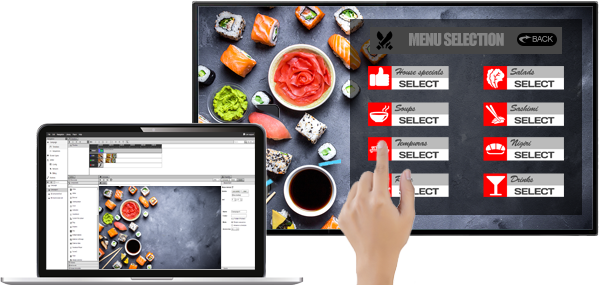
Touch screen menu built in SignStudio running on a touch display

touch screen digital signage

turn any touch display into an interactive kiosk

Build touch menus, directories, catalogs and self-service kiosks in SignStudio with no code, then run them on any commercial touch screen, touch monitor or tablet with the SignPlayer. The first 3 screens are free forever.

start free, no credit card

the mediaFRAME overlay kit is discontinued, here is what to use instead

touch hardware that works with the SignPlayer

any display that reports touch to the player

The SignPlayer takes touch input from whatever the operating system sees as a touch device, so you are not tied to one brand or one kit. Pick the hardware that fits the venue:

  • commercial touch displays with a built-in touch panel, driven by an Android, Windows or Chrome OS player or by the display's own Android SoC
  • touch monitors and interactive whiteboards connected over HDMI plus USB touch
  • Android tablets and iPads (the iPad runs the web player in Safari)
  • infrared touch overlays from third-party vendors that fit over a regular TV and connect by USB, the same approach the mediaFRAME used

Pair the display with a player that has the performance for smooth touch response: a mid-range Android box, a Chromebox, a small Windows PC or a tablet. Very cheap sticks can lag on animated interactive scenes.

We no longer sell or ship the mediaFRAME kit. If you own one and have a question about it, contact live chat.

what the software gives you

mediaTOUCH, built into SignStudio and SignPlayer

Interactive presentations are built in the same SignStudio editor as the rest of your screens, with touch components such as buttons, a virtual keyboard, carousels and navigation between scenes, plus dozens of pre-made touch templates to start from. A kiosk can time out back to a scheduled attract loop when nobody is using it.

  • touch components are included in mediaCLOUD Plus+ from $3 per screen per month
  • locked kiosk mode and the full interactive feature set are part of Enterprise
  • one account manages your touch kiosks and your regular screens together

mediaTOUCH interactive digital signage
no-code touch apps at interactive.DigitalSignage.com
plans and pricing

from the docs

Touch screen technologies for digital signage compared
Interactive kiosk deployment guide
Touch screen and kiosk FAQ

Frequently Asked Questions

Last updated October 22, 2026. Published by DigitalSignage.com (MediaSignage Inc., since 2006).

Does DigitalSignage.com still sell the mediaFRAME touch overlay?

No. The mediaFRAME kiosk conversion kit is discontinued and no longer sold or shipped. Touch presentations built in SignStudio run on any commercial touch display, touch monitor, tablet or third-party USB touch overlay connected to a SignPlayer.

What touch screens work with DigitalSignage.com?

Any touch-enabled display that presents itself to the player as a touch input: commercial touch screens, touch monitors, interactive whiteboards, Android tablets and iPads. Multi-touch gestures work on hardware that reports them.

Which plan includes touch and kiosk features?

Touch components are part of mediaCLOUD Plus+ from $3 per screen per month. Locked kiosk mode and the full interactive feature set are part of the Enterprise plan. The first 3 screens on any account are free forever.

live examples, see it in action

Checkout live examples of Digital Signage presentations. The SignPlayer can run everywhere, on Android, Windows, Mac, iPad and even inside your web browser

View More

product pricing

Find out why people call us “the world’s most popular digital signage platform”

View More

customers

Can it really be free?
What’s the catch?
Want to be amazed?
Read on...

View More